Abandoned Cart Emails: How to Recover the Sales You’re Already Losing
Here’s an uncomfortable truth about running an online store: most of the people who add something to their cart never buy it. Across e-commerce, roughly seven out of ten carts are abandoned — shoppers get distracted, compare prices, balk at shipping, or simply close the tab meaning to come back later and never do.
The good news? Those shoppers already wanted your product. They’re not cold leads — they’re warm buyers who got interrupted. And the single most effective way to win them back is one you can set up once and let run forever: the abandoned cart email.
This guide explains why these emails work so well, what to put in each one, the timing that recovers the most revenue, and how to set up your own recovery flow in Uppush.
In this guide
- Why abandoned cart emails work so well
- Why shoppers abandon carts in the first place
- The three-email recovery sequence
- Timing: speed is everything
- The discount trap: protect your margin
- Best practices that lift recovery rates
- How to set up cart recovery in Uppush
- Final thoughts
Why abandoned cart emails work so well
Abandoned cart emails consistently outperform almost every other type of marketing email — because the recipient has already shown clear buying intent. They didn’t just browse; they picked a product, chose a size or color, and started checking out. You’re not convincing them to want something. You’re just removing the last bit of friction.
The metrics reflect that intent. Industry data puts abandoned cart email open rates around 40–45% and conversion rates near 10–11% on average — with top-performing brands recovering far more. Per recipient, a cart email often earns several dollars in recovered revenue, many times what a standard promotional blast brings in.
Scale that across a year and it’s enormous. Most stores recover only 3–5% of abandoned carts today, while the best recover 10–14% — up to four times more — largely by getting the timing, content, and inbox placement right. Everything below is about closing that gap.
Why shoppers abandon carts in the first place
To write emails that win shoppers back, it helps to know why they left. The most common reasons, year after year, are remarkably consistent:
- Unexpected costs. Shipping fees, taxes, or surcharges revealed at checkout are the number-one reason carts are abandoned.
- “Just looking.” A large share of shoppers are genuinely still comparing and weren’t ready to buy yet.
- Forced account creation. Being made to sign up before buying kills momentum.
- A long or confusing checkout. Too many form fields, too many steps.
- Simple distraction. A phone call, a crying child, a closed laptop — life interrupts.
Notice that most of these aren’t “I don’t want this.” They’re “not right now” or “not at this price.” Your recovery emails should speak directly to that hesitation — which is exactly how the sequence below is built.
The three-email recovery sequence
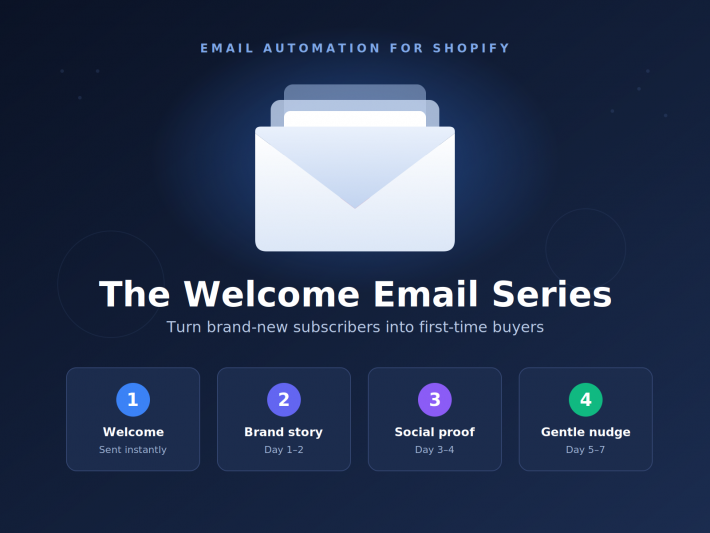
One reminder email is good. A short series recovers far more — sending three cart emails rather than one can multiply recovered revenue several times over. Each email in the sequence has a distinct job.
Email 1: The friendly reminder (sent within ~1 hour)
This is your highest-value message, so keep it simple and helpful — not salesy. Many shoppers genuinely just forgot or got interrupted, and a gentle nudge is all they need.
- Show them exactly what they left. Include the product image, name, and price. Seeing the item rekindles the original desire.
- Make returning effortless. One prominent button — “Return to your cart” — that takes them straight back to checkout with items still in place.
- Keep the tone warm and low-pressure. “Did you forget something?” works far better than “BUY NOW.”
- No discount yet. Many people complete the purchase on this email alone — don’t give away margin you didn’t need to.
Email 2: Handle the hesitation (sent ~24 hours later)
If they haven’t returned, something is holding them back. This email’s job is to remove doubt and build confidence.
- Add social proof. Reviews or ratings for the exact product in their cart are powerfully reassuring.
- Answer objections. Highlight free returns, a satisfaction guarantee, secure checkout, or shipping details — whatever addresses the common reasons people hesitate.
- Reinforce value. Remind them why the product is worth it: a key benefit, what makes it special, or that it’s a popular or low-stock item.
Email 3: The final call (sent ~48–72 hours later)
This is your last touch in the sequence, aimed at the still-undecided. Here, gentle urgency — and, if it fits your strategy, an incentive — earns its place.
- Create honest urgency. “Your cart is about to expire,” or a genuine low-stock note on the item.
- Consider a targeted incentive. If margin allows, a small discount or free shipping offer can tip a price-sensitive shopper over the line (more on using this wisely below).
- Make it easy to say yes. One clear CTA, no clutter, straight back to checkout.
Timing: speed is everything
With cart recovery, timing is one of the biggest levers you have. Intent fades fast — the longer you wait, the more likely the shopper has bought elsewhere or moved on. Sending the first email within about an hour of abandonment can meaningfully lift conversions compared with waiting a day.
A reliable cadence for the full sequence:
- Email 1 — within 1 hour
- Email 2 — around 24 hours later
- Email 3 — around 48–72 hours after that
And the obvious-but-critical rule: the moment a shopper completes the purchase, stop the sequence. Nothing erodes trust faster than a “you left something behind!” email arriving after someone has already paid. Good automation handles this for you automatically.
The discount trap: protect your margin
It’s tempting to lead every cart email with a discount. Resist it. If you always offer 10% off in the first email, you train shoppers to abandon their carts on purpose, knowing a code is coming. You end up paying people to do what many would have done anyway.
A smarter approach:
- Lead with a reminder, not a discount. Let Email 1 (and ideally Email 2) recover the shoppers who just needed a nudge — at full margin.
- Reserve incentives for the final email, and only for shoppers who haven’t responded. This targets the truly price-sensitive without discounting everyone.
- Test before assuming. Some stores recover plenty without ever offering a discount. Try a no-discount sequence first and measure it.
Best practices that lift recovery rates
- Personalize with the actual cart. Dynamic product images and details from their specific cart vastly outperform generic “complete your order” messages.
- Write a subject line that reminds, not shouts. “You left something behind” or referencing the product by name beats aggressive all-caps urgency.
- Design for mobile first. Most shoppers will open these on a phone — a single clear button and a clean layout matter enormously.
- Protect deliverability. A recovery email that lands in spam recovers nothing. Authenticated sending and a clean list keep these high-value messages in the inbox.
- A/B test over time. Subject lines, timing, and whether to include an incentive are all worth testing. Small, steady improvements compound into real revenue.
How to set up cart recovery in Uppush
You don’t need a developer to capture this revenue. Uppush includes automated abandoned cart and checkout recovery flows built specifically for Shopify, so they tap directly into your store’s cart and order data.
The setup looks like this:
- Connect your store. Uppush integrates with Shopify, so cart and checkout events trigger your flow automatically — no manual tracking to maintain.
- Choose the trigger. Start the flow when a shopper abandons their cart or checkout.
- Build the sequence. Add your two to three emails, set the delays between them (starting within the first hour), and use Uppush’s templates to design each one without code.
- Pull in the cart dynamically. Insert the exact products the shopper left, along with images and prices, so every email is personalized automatically.
- Set the stop condition. Configure the flow to halt the instant a purchase is completed, so nobody gets a recovery email after buying.
- Launch and let it run. Because Uppush charges based on emails sent rather than your total contact count, this high-ROI flow stays cost-efficient no matter how large your store grows.
Final thoughts
Abandoned cart emails are about as close to “free money” as marketing gets. The shoppers already wanted to buy, the emails are automated, and the returns per message are among the highest in all of email marketing. If you’re driving traffic to your store but not running a recovery flow, you’re quietly losing sales you’ve already paid to acquire.
Start with a simple two- or three-email sequence, fire the first one fast, lead with a reminder before any discount, and stop the moment someone buys. Then watch how much revenue was hiding in carts you thought you’d lost.
Ready to recover it? Open your Uppush automation tab and set up your abandoned cart flow today.
Suggested SEO meta description (under 160 characters): Most carts get abandoned — but the sales aren’t lost. Learn the proven abandoned cart email sequence, ideal timing, and how to set one up in Uppush for Shopify.