
Skip to content
Logo
  • Email Marketing
  • Web Push
  • Pricing
  • Blog
  • Help
  • Contact
Documentation
Install app
Email Essentials, Email Marketing, Marketing, Strategies

Introducing Email List Cleaning in Uppush
2025-07-03 admin No comments yet

Email list cleaning, or Clean up contacts, is a powerful way to keep your campaigns performing at their best. By removing invalid, disposable, or inactive addresses from your subscriber list, you’ll:

  • Protect deliverability: Fewer bounces and spam complaints mean inbox providers like Gmail and Yahoo continue to trust your send-outs.
  • Boost engagement: A leaner list of real, interested subscribers drives higher open and click rates.
  • Lower costs: You won’t waste emails—or opportunities—on addresses that were never going to convert.
  • Maintain reputation: Avoid spam traps and hard bounces that can erode your sender score over time.

To support your growth, Uppush now includes a built-in Clean up contacts feature—available exclusively for Pro plan users—at just $0.3 per 100 contacts. This helps you maintain a healthy, high-performing list and improve your email deliverability.

*** Please note: there is a minimum charge of $0.50 per clean-up.
This means if you clean 100 contacts, the cost will still be $0.50.
This minimum fee helps us cover the infrastructure and processing cost to ensure fast and accurate cleaning results.
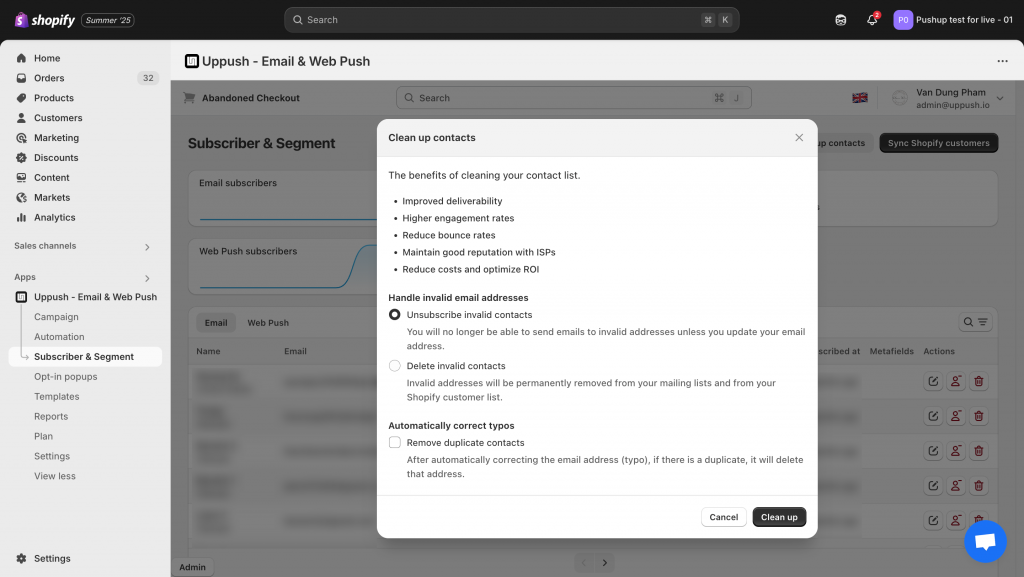
The Clean up contacts feature in Uppush

What Email List Cleaning Does

Within Uppush, the cleaning tool helps you deal with invalid or risky email addresses in a few ways:

  • Scan your contact list for:
    • Invalid or unreachable email addresses
    • Disposable or temporary domains
    • Common typo-based domains (e.g. gmal.com)
    • Duplicate contacts
  • Choose how to handle invalid contacts:
    • Unsubscribe invalid contacts – These contacts will remain in your list, but won’t receive future emails unless their address is updated.
    • Delete invalid contacts – Permanently removes them from both your Uppush list and your Shopify customer list.
  • Automatically correct common typos (e.g. fixing gmial.com to gmail.com).
  • Optionally remove duplicates after typo correction to avoid sending to the same contact twice.

After cleanup, your subscriber count will update, and unsubscribed contacts won’t be billed or emailed moving forward. Any removed contacts will also be excluded from your future campaigns and automations.

When to Run a Cleanup

While exact cadence depends on your store and volume, common best practices include:

  • Before major campaigns or promotions.
  • Quarterly or bi-annually for most stores.
  • Any time you see rising bounce rates or falling engagement.

Regular cleaning helps you catch problems early and preserve long-term performance.

Where to Find It

You can access this feature by going to:
Subscriber & Segment → Clean up contacts in your Uppush dashboard.
(Available on the Pro plan.)
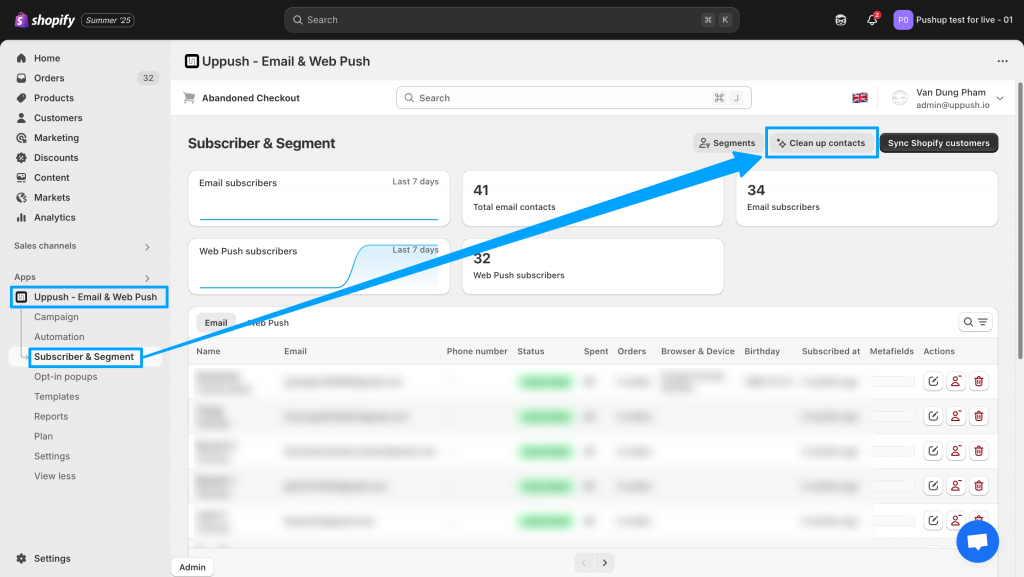
To find the feature, go to the Uppush app > Subscriber & Segment > Clean up contacts

Next Steps

When you’re ready to clean up your list and sharpen your deliverability, you’ll find everything you need inside Uppush. If you have questions about how it works or want help reviewing your results, feel free to reach out to our support team anytime.

  • clean up contacts
  • email list cleaning
  • email marketing
  • new features
admin

Post navigation

Previous
Next

Search

Categories

  • Business (5)
  • Email Automation (5)
  • Email Essentials (8)
  • Email Marketing (20)
  • Free Features (3)
  • Guides (6)
  • Marketing (7)
  • Push Notifications (4)
  • Strategies (9)
  • Web Push (1)

Recent posts

  • How to warm your sending domain in Uppush
  • Automate Your Shopify Marketing with Free Email Tools | Uppush
    Automate Your Marketing for Free
  • Grow Your Shopify Email List with Free Popups | Uppush
    Grow Your List with Free Email Popups

Tags

abandoned cart recovery abandoned checkout recovery BIMI boost sales clean up contacts domains email automation email list cleaning email marketing email popups free features new features push notifications Update web push

Related posts

Business, Email Automation, Email Essentials, Email Marketing, Guides, Marketing

How to warm your sending domain in Uppush

2025-11-20 admin No comments yet

Understand the concept of email warm-up and how to perform it using Uppush’s features. When you change your email marketing platform or domain, your email server will also change. It’s crucial to note that your new server can only send a small number of emails in one go. To ensure email deliverability, gradually increase sending […]

Automate Your Shopify Marketing with Free Email Tools | Uppush
Email Automation, Email Marketing, Free Features, Marketing, Strategies

Automate Your Marketing for Free

2025-11-13 admin No comments yet

Manually sending follow-up emails takes time — but with Uppush, you can automate much of it effortlessly. Our automation tools help you stay connected with customers and boost conversions, and most are available for free. What Are Email Automations? Email automations are messages that send automatically based on customer behavior. For example: These workflows run […]

Grow Your Shopify Email List with Free Popups | Uppush
Email Automation, Email Essentials, Email Marketing, Free Features, Guides, Marketing, Strategies

Grow Your List with Free Email Popups

2025-10-30 admin No comments yet

Your store visitors are most engaged while browsing your site — that’s the perfect time to invite them to subscribe. With Uppush, you can create beautiful email popups to collect subscribers automatically, with no coding required. Best of all, it’s completely free. Why Email Popups Matter Email marketing is still one of the most reliable […]

Craft stunning email campaign & web push effortlessly while enjoying 24/7 customer support.

Features
  • Email service
  • Web push
Resources
  • Support center
  • FAQ
  • Blog
  • Privacy policy
Want to receive news and updates?


    © Uppush. All Rights Reserved.