
Skip to content
Logo
  • Email Marketing
  • Web Push
  • Pricing
  • Blog
  • Help
  • Contact
Documentation
Install app
Email Automation, Email Essentials, Email Marketing, Strategies

Introducing Blocked Email Domains in Uppush
2025-06-27 admin No comments yet

Maintaining high email deliverability is crucial to the long-term success of your marketing efforts. One overlooked but important part of this is managing the types of email addresses you allow into your contact list — especially when it comes to suspicious or low-quality domains.

That’s where Uppush’s Blocked domains feature comes in.
Why Blocking Email Domains Matters

Certain email domains are known for generating spammy or anonymous contacts. These often come from external marketplaces or bulk-signup tools and are associated with low engagement, high bounce rates, or spam traps.

Continuing to email these types of addresses can slowly damage your sender reputation and reduce the chances of your messages reaching real customers’ inboxes.

To help prevent that, Uppush now gives you a way to automatically block or unsubscribe contacts using specific email domains — so you stay in control of your list quality.

How the Blocked Domains Feature Works

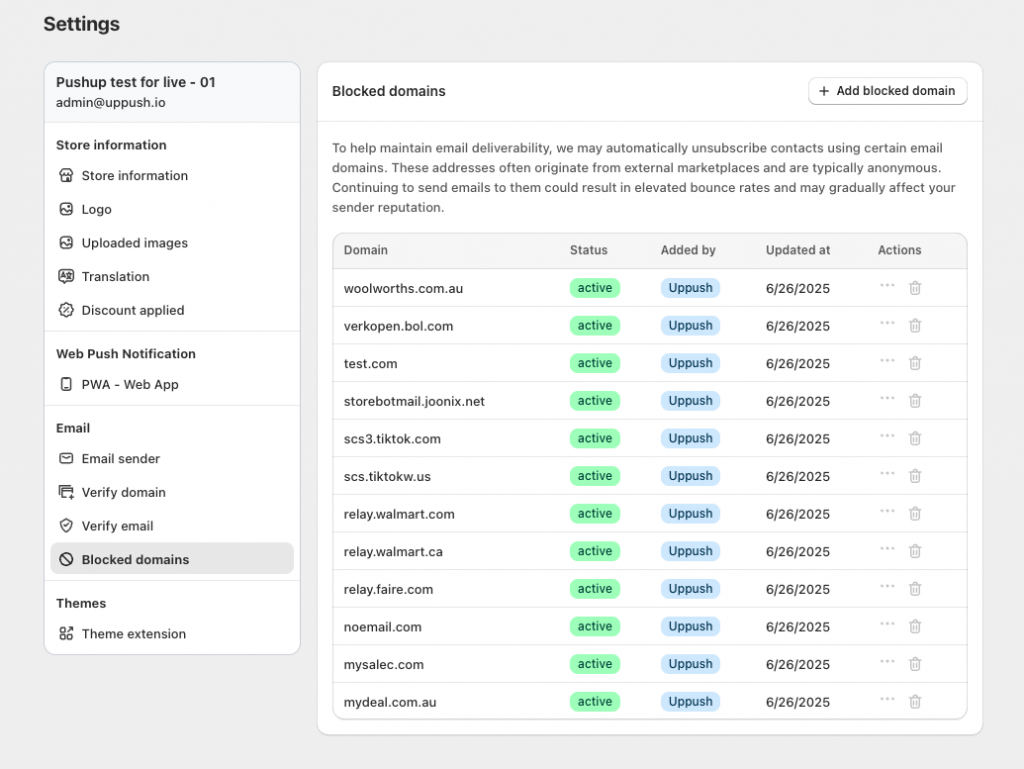
You can find this feature in the Settings tab under Blocked domains.

Uppush comes with a preloaded list of commonly abused domains known for spam or fake signups. These might include domains from disposable email providers, bots, or anonymous email services.

In addition, you can:

  • Add your own domains to the blocklist
  • Remove or temporarily deactivate blocking for your added domains if you want to allow them
  • Review and manage the list at any time

When a subscriber attempts to sign up using an email address from a blocked domain, Uppush will automatically prevent them from being added to your contact list — or unsubscribe them if they already exist.

What Counts as a Suspicious Domain?

Examples of domains you might want to block include:

  • Disposable or temporary email providers (e.g. mailinator.com, tempmail.com)
  • Domains known to generate fake Shopify orders
  • Certain reseller or marketplace platforms where email addresses don’t represent real buyers

If you see unusual patterns in your subscriber list, or notice high bounce rates, it may be worth reviewing your blocked domains list.

How This Helps Your Deliverability

By filtering out low-quality or anonymous addresses, you’re reducing the chances of:

  • High bounce rates
  • Spam complaints
  • Poor engagement metrics

All of which are factors that email providers like Gmail and Yahoo use to determine if your messages should land in the inbox or be filtered as spam.

Think of blocked domains as a quiet, behind-the-scenes way to protect your reputation.

Need Help?

The blocked domains feature is turned on by default with our recommended list. But you can always add more to the list and fine-tune it based on your store’s experience.

If you’re unsure whether to block a specific domain or want to learn more about improving your deliverability, reach out to our support team — we’re here to help.


  • domains
  • email automation
  • email marketing
  • new features
  • Update
admin

Post navigation

Previous
Next

Search

Categories

  • Business (5)
  • Email Automation (5)
  • Email Essentials (8)
  • Email Marketing (20)
  • Free Features (3)
  • Guides (6)
  • Marketing (7)
  • Push Notifications (4)
  • Strategies (9)
  • Web Push (1)

Recent posts

  • How to warm your sending domain in Uppush
  • Automate Your Shopify Marketing with Free Email Tools | Uppush
    Automate Your Marketing for Free
  • Grow Your Shopify Email List with Free Popups | Uppush
    Grow Your List with Free Email Popups

Tags

abandoned cart recovery abandoned checkout recovery BIMI boost sales clean up contacts domains email automation email list cleaning email marketing email popups free features new features push notifications Update web push

Related posts

Business, Email Automation, Email Essentials, Email Marketing, Guides, Marketing

How to warm your sending domain in Uppush

2025-11-20 admin No comments yet

Understand the concept of email warm-up and how to perform it using Uppush’s features. When you change your email marketing platform or domain, your email server will also change. It’s crucial to note that your new server can only send a small number of emails in one go. To ensure email deliverability, gradually increase sending […]

Automate Your Shopify Marketing with Free Email Tools | Uppush
Email Automation, Email Marketing, Free Features, Marketing, Strategies

Automate Your Marketing for Free

2025-11-13 admin No comments yet

Manually sending follow-up emails takes time — but with Uppush, you can automate much of it effortlessly. Our automation tools help you stay connected with customers and boost conversions, and most are available for free. What Are Email Automations? Email automations are messages that send automatically based on customer behavior. For example: These workflows run […]

Grow Your Shopify Email List with Free Popups | Uppush
Email Automation, Email Essentials, Email Marketing, Free Features, Guides, Marketing, Strategies

Grow Your List with Free Email Popups

2025-10-30 admin No comments yet

Your store visitors are most engaged while browsing your site — that’s the perfect time to invite them to subscribe. With Uppush, you can create beautiful email popups to collect subscribers automatically, with no coding required. Best of all, it’s completely free. Why Email Popups Matter Email marketing is still one of the most reliable […]

Craft stunning email campaign & web push effortlessly while enjoying 24/7 customer support.

Features
  • Email service
  • Web push
Resources
  • Support center
  • FAQ
  • Blog
  • Privacy policy
Want to receive news and updates?


    © Uppush. All Rights Reserved.